NLP 101: Text Prepocessing 1 - Tokenization

:
What all tools we need for NLP ?
NLP 101: Text Preprocessing 1 - Cleaning the input
NLP 201: Text Prepocessing 2 - Basic(Input Text -> Vector)
- One hot Encoding
- BOW
- TF/IDF
- Unigram, Bigram N-grams
NLP 202: Text Prepocessing 3 - Advanced(Input Text -> Vector)
- Word-Embeddings
- Word2Vec, Average Word2Vec
- Glove
NLP 301: Deep Learning - Basic(Modelling)
- RNN
- LSTM
- GRU
NLP 302: Deep Learning - Advanced(Modelling)
- Encoder-Decoder
- Transformers
- Bert
- Corpus: A structured collection of texts used for NLP tasks. It is collection of Documents. for ex. Paragraph
- Documents: Individual units of text within a corpus. It represent a fact or an entity for ex. Sentences
- Vocabulary: The set of unique words in a corpus. for ex. Unique Words
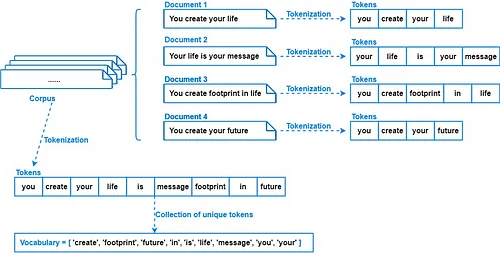 Source: Medium
Tokenization
We tokenize corpus into
Installation:
!pip install nltkRequirement already satisfied: nltk in /usr/local/lib/python3.10/dist-packages (3.8.1) Requirement already satisfied: click in /usr/local/lib/python3.10/dist-packages (from nltk) (8.1.7) Requirement already satisfied: joblib in /usr/local/lib/python3.10/dist-packages (from nltk) (1.4.2) Requirement already satisfied: regex>=2021.8.3 in /usr/local/lib/python3.10/dist-packages (from nltk) (2023.12.25) Requirement already satisfied: tqdm in /usr/local/lib/python3.10/dist-packages (from nltk) (4.66.4)
- NLTK, which stands for Natural Language Toolkit
- It comes with easy-to-use tools to access lots of different types of language data, like WordNet.
- NLTK also has helpful tools for working with text, like splitting it into words, figuring out what type of word it is, and understanding its meaning.
corpus = """Hello, My name is Kamesh Dubey;
I am studying Master's of Statistics.
My Favourite topic in ML: Semi-Supervised Learning! I recently did a project on it
""" # This paragraph is called corpuscorpus"Hello, My name is Kamesh Dubey;\nI am studying Master's of Statistics.\nMy Favourite topic in ML: Semi-Supervised Learning! I recently did a project on it\n"
print(corpus)Hello, My name is Kamesh Dubey; I am studying Master's of Statistics. My Favourite topic in ML: Semi-Supervised Learning! I recently did a project on it
1. Sentence Tokenizer
import nltk
nltk.download('punkt')
[nltk_data] Downloading package punkt to /root/nltk_data... [nltk_data] Unzipping tokenizers/punkt.zip.
True
Note:
- First-time nltk tokenize use or fresh environment requires punkt download.
- sent_tokenize needs punkt tokenizer models; NLTK prompts for download if absent.
from nltk.tokenize import sent_tokenize # Sentence Tokenizerdocuments = sent_tokenize(corpus)
documents["Hello, My name is Kamesh Dubey;\nI am studying Master's of Statistics.", 'My Favourite topic in ML: Semi-Supervised Learning!', 'I recently did a project on it']
for sentence in documents:
  print(sentence)
  print()
Hello, My name is Kamesh Dubey; I am studying Master's of Statistics. My Favourite topic in ML: Semi-Supervised Learning! I recently did a project on it
2. Word Tokenizer
Famous word tokenizers in nltk:
2.1 Word Tokenizer
It helps break down text into individual words, which is useful for understanding and analyzing language in various ways.
from nltk.tokenize import word_tokenize # Word Tokenizerwords = word_tokenize(corpus)
words['Hello', ',', 'My', 'name', 'is', 'Kamesh', 'Dubey', ';', 'I', 'am', 'studying', 'Master', "'s", 'of', 'Statistics', '.', 'My', 'Favourite', 'topic', 'in', 'ML', ':', 'Semi-Supervised', 'Learning', '!', 'I', 'recently', 'did', 'a', 'project', 'on', 'it']
for sentence in documents:
  print(word_tokenize(sentence))
['Hello', ',', 'My', 'name', 'is', 'Kamesh', 'Dubey', ';', 'I', 'am', 'studying', 'Master', "'s", 'of', 'Statistics', '.'] ['My', 'Favourite', 'topic', 'in', 'ML', ':', 'Semi-Supervised', 'Learning', '!'] ['I', 'recently', 'did', 'a', 'project', 'on', 'it']
'wordpunct_tokenize' tokenizer splits text into words and punctuation marks, treating punctuation marks also as separate tokens.
Note: Word tokenizer splits text into words, while wordpunct_tokenizer additionally tokenizes punctuation marks as separate tokens.
from nltk.tokenize import wordpunct_tokenize #it is also like word tokenizer but it is treating punctuation as seperate words

wordpunct_tokenize(corpus)
['Hello', ',', 'My', 'name', 'is', 'Kamesh', 'Dubey', ';', 'I', 'am', 'studying', 'Master', "'", 's', 'of', 'Statistics', '.', 'My', 'Favourite', 'topic', 'in', 'ML', ':', 'Semi', '-', 'Supervised', 'Learning', '!', 'I', 'recently', 'did', 'a', 'project', 'on', 'it']
- The TreebankWord Tokenizer in NLTK is good at breaking down text in a way that's commonly seen in English writing.
- It knows how to handle contractions like "don't" and punctuation. Its tokenization is based on Penn Treebank corpus
For example:
Input Text: "Don't hesitate to ask questions."

Tokenized Output: ['Do', "n't", 'hesitate', 'to', 'ask', 'questions', '.']
In this example, it correctly splits "don't" into "do" and "n't", and treats punctuation like "." as separate tokens. This tool is often used for understanding English text in natural language processing.
from nltk.tokenize.treebank import TreebankWordTokenizertokenizer = TreebankWordTokenizer()
tokenizer.tokenize(corpus)['Hello', ',', 'My', 'name', 'is', 'Kamesh', 'Dubey', ';', 'I', 'am', 'studying', 'Master', "'s", 'of', 'Statistics.', 'My', 'Favourite', 'topic', 'in', 'ML', ':', 'Semi-Supervised', 'Learning', '!', 'I', 'recently', 'did', 'a', 'project', 'on', 'it']
Stemming
eg:
- [going, gone, goes] -> go
- [eating, eaten, eats] -> eat
1. Porterstemmer
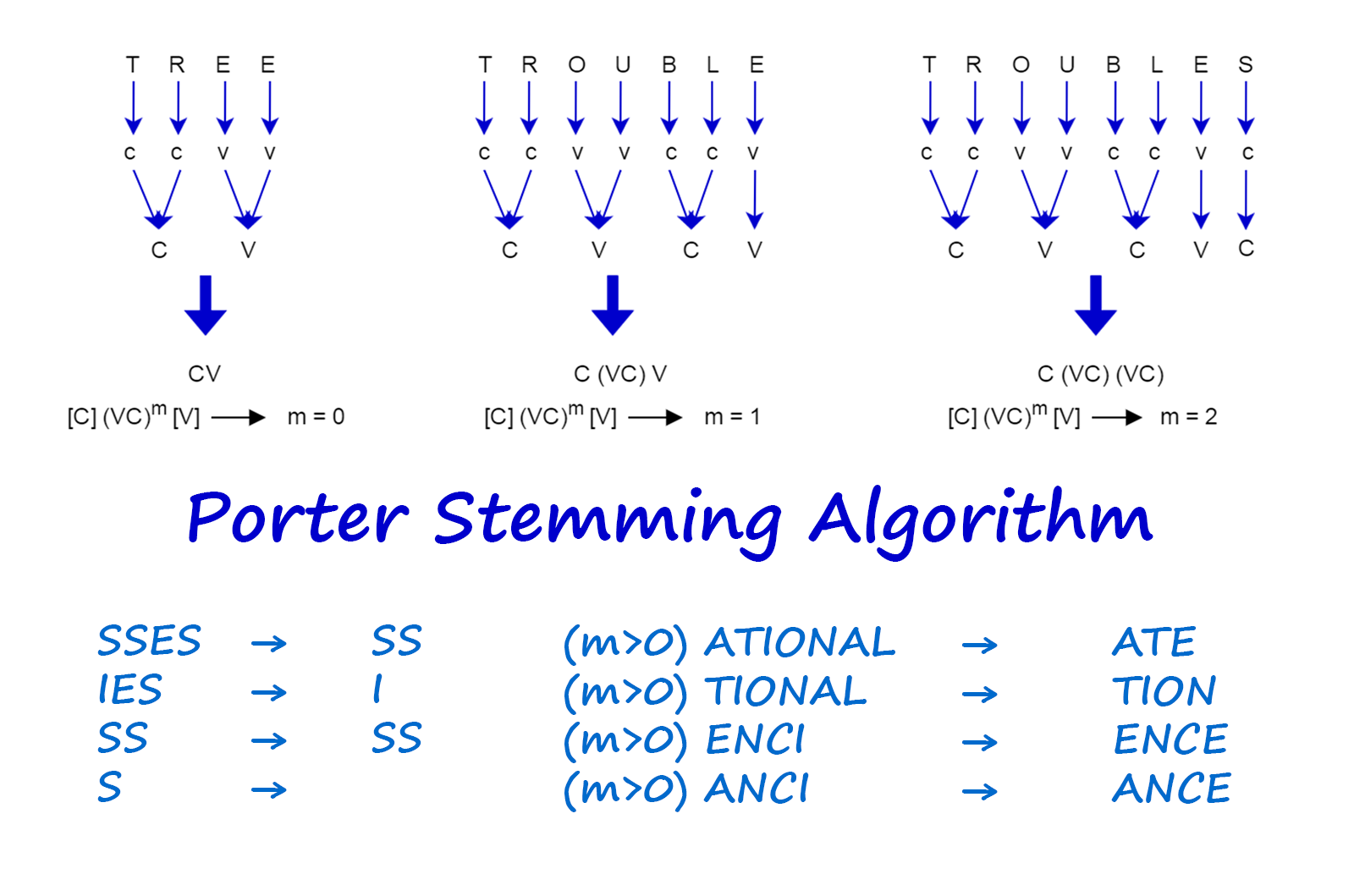
Source: vijinimallawaarachchi.com

Note1:
- We first find tokenize the document.
- Then, apply predefined rules of porter stemming algorithm (1a-1e) to accurately strip common suffixes in order to find the stem of the word.
Note2:
- It gives incorrect output for some words
- Over-stemming: Porter stemming can excessively strip suffixes, leading to stems that aren't linguistically valid, termed over-stemming.
- Under-stemming: Conversely, it may fail to strip all suffixes when necessary, resulting in related words not sharing the same stem, known as under-stemming.
- Language Specificity: While effective for English, Porter stemming's rules may not apply well to other languages, limiting its use in multilingual settings.
- Lack of Semantic Understanding: Operating purely on string manipulation, the algorithm may miss nuances in word variations due to a lack of semantic comprehension.
- Performance Trade-offs: Porter stemming prioritizes efficiency over linguistic precision, necessitating careful consideration of trade-offs between accuracy and speed for specific tasks.
words = ["going", "gone", "goes", "eating", "eaten", "eats", "finally", "finals"]from nltk.stem import PorterStemmerstemming = PorterStemmer()for word in words:
print(word+"------------> "+stemming.stem(word))going------------> go gone------------> gone goes------------> goe eating------------> eat eaten------------> eaten eats------------> eat finally------------> final finals------------> final
stemming.stem("Institute")'institut'
2. Snowball Stemmer
Note: Snowball supports multiple languages and not only english.
- The Snowball Stemmer tends to be more aggressive in its stemming approach compared to the Porter Stemmer.
- Snowball Stemmer addresses some known issues present in the Porter Stemmer, offering improvements and fixes.
- In Snowball Stemmer, words like 'fairly' and 'sportingly' are stemmed to 'fair' and 'sport', whereas in Porter Stemmer, they are stemmed to 'fairli' and 'sportingli'.
from nltk.stem import SnowballStemmersnowball_stemmer = SnowballStemmer("english")for word in words:
print(word+"----------->"+snowball_stemmer.stem(word))going----------->go gone----------->gone goes----------->goe eating----------->eat eaten----------->eaten eats----------->eat finally----------->final finals----------->final
3. RegexpStemmer
It combines the power of regular expressions(re) with stemming. It would use regular expressions to identify patterns in words and then apply stemming rules to reduce those words to their base forms.
- RegExpStemmers involve complex regex patterns which can be challenging to handle.
- RegExpStemmers lack context awareness in stemming.
- They are prone to both overstemming and understemming.
- RegExpStemmers can be computationally inefficient, especially with large datasets.
- They might not generalize well across different languages.
from nltk.stem import RegexpStemmerreg_stemmer = RegexpStemmer('ing$|s$|e$|able$', min = 4)reg_stemmer.stem("seating")'seat'
reg_stemmer.stem("breathable")'breath'
reg_stemmer.stem("ingseating")'ingseat'
Lemmatization
Wordnet Lemmatizer
How Lemmatization differs from stemming?
- Stemming takes a word down to its root form by removing its prefixes and suffixes.
- Lemmatization considers the context and meaning of a word and tries to convert it to a more meaningful and easier-to-work format.
For example:
- The words was, is, and will be can all be lemmatized to the word be.
- Similarly, the words better and best can be lemmatized to the word good.
Note: Generally, lemmatization is more sophisticated and accurate than stemming but can also be more computationally expensive.
import nltk
nltk.download('wordnet')
[nltk_data] Downloading package wordnet to /root/nltk_data...
True
Note:
- First-time NLTK use or fresh environment requires wordnet download.
- WordNetLemmatizer needs wordnet model; NLTK prompts for download if absent.
from nltk.stem import WordNetLemmatizerlemmatizer = WordNetLemmatizer()lemmatizer.lemmatize("eating")'eating'
It is giving you result with respect to noun by default, but since POS for eating is verb we need to pass it manually to lemmatize.
pos
- noun - n
- verb = v
- adjective - a
- adverb - r
lemmatizer.lemmatize("eating", pos='v')'eat'
lemmatizer.lemmatize("strongest", pos='a')'strong'
Stopwords
Note1: "stop words" usually refers to the most common words in a language.
Note2: stopwords from different language is available in nltk library.
Pros:
- Efficiency: Removing stop words reduces dataset size and training time.
- Improved Performance: Eliminating stop words enhances token significance and classification accuracy.
Cons:
- Semantic Alteration: Improper stop word selection can change text meaning.
corpus = """Semi-supervised learning sits between two types of machine learning. In regular supervised learning, we only train models with labeled data. In
unsupervised learning, models explore unlabeled data. Semi-supervised learning cleverly uses both labeled and unlabeled data to make models better. Imagine
you have some photos of cats, but not all of them are labeled "cat." Semi-supervised learning helps by using both the labeled "cat" photos and the unlabeled
ones to improve its understanding of what a cat looks like.One trick it uses is to look at all the photos, labeled or not, and find  similarities between them.
This helps the model learn better, especially when there aren't many labeled photos to learn from.Another way it works is by making sure the model gives similar
answers for similar-looking photos, whether they're labeled or not. This makes the model more reliable and better at figuring out new, unseen photos. Semi-
supervised learning is handy in lots of areas, like recognizing objects in pictures, understanding language, or even understanding spoken words. It's especially
useful when there aren't many labeled examples to learn from but plenty of unlabeled data around.
"""
import nltk
nltk.download('stopwords')[nltk_data] Downloading package stopwords to /root/nltk_data... [nltk_data] Unzipping corpora/stopwords.zip.
True
from nltk.stem import PorterStemmer

from nltk.corpus import stopwordsstopwords.words("english")['i', 'me', 'my', 'myself', 'we', 'our', 'ours', 'ourselves', 'you', "you're", "you've", "you'll", "you'd", 'your', 'yours', 'yourself', 'yourselves', 'he', 'him', 'his', 'himself', 'she', "she's", 'her', 'hers', 'herself', 'it', "it's", 'its', 'itself', 'they', 'them', 'their', 'theirs', 'themselves', 'what', 'which', 'who', 'whom', 'this', 'that', "that'll", 'these', 'those', 'am', 'is', 'are', 'was', 'were', 'be', 'been', 'being', 'have', 'has', 'had', 'having', 'do', 'does', 'did', 'doing', 'a', 'an', 'the', 'and', 'but', 'if', 'or', 'because', 'as', 'until', 'while', 'of', 'at', 'by', 'for', 'with', 'about', 'against', 'between', 'into', 'through', 'during', 'before', 'after', 'above', 'below', 'to', 'from', 'up', 'down', 'in', 'out', 'on', 'off', 'over', 'under', 'again', 'further', 'then', 'once', 'here', 'there', 'when', 'where', 'why', 'how', 'all', 'any', 'both', 'each', 'few', 'more', 'most', 'other', 'some', 'such', 'no', 'nor', 'not', 'only', 'own', 'same', 'so', 'than', 'too', 'very', 's', 't', 'can', 'will', 'just', 'don', "don't", 'should', "should've", 'now', 'd', 'll', 'm', 'o', 're', 've', 'y', 'ain', 'aren', "aren't", 'couldn', "couldn't", 'didn', "didn't", 'doesn', "doesn't", 'hadn', "hadn't", 'hasn', "hasn't", 'haven', "haven't", 'isn', "isn't", 'ma', 'mightn', "mightn't", 'mustn', "mustn't", 'needn', "needn't", 'shan', "shan't", 'shouldn', "shouldn't", 'wasn', "wasn't", 'weren', "weren't", 'won', "won't", 'wouldn', "wouldn't"]
Note:
Let's use it in corpus
import nltk
from nltk.corpus import stopwords
from nltk.tokenize import word_tokenize, sent_tokenize
from nltk.stem import PorterStemmernltk.sent_tokenize(corpus)['Semi-supervised learning sits between two types of machine learning.', 'In regular supervised learning, we only train models with labeled data.', 'In\nunsupervised learning, models explore unlabeled data.', 'Semi-supervised learning cleverly uses both labeled and unlabeled data to make models better.', 'Imagine\nyou have some photos of cats, but not all of them are labeled "cat."', 'Semi-supervised learning helps by using both the labeled "cat" photos and the unlabeled\nones to improve its understanding of what a cat looks like.One trick it uses is to look at all the photos, labeled or not, and find similarities between them.', "This helps the model learn better, especially when there aren't many labeled photos to learn from.Another way it works is by making sure the model gives similar\nanswers for similar-looking photos, whether they're labeled or not.", 'This makes the model more reliable and better at figuring out new, unseen photos.', 'Semi-\nsupervised learning is handy in lots of areas, like recognizing objects in pictures, understanding language, or even understanding spoken words.', "It's especially\nuseful when there aren't many labeled examples to learn from but plenty of unlabeled data around."]
# Applying Stemming on first tokenized sentence

stemmer = PorterStemmer()
print("nltk.sent_tokenize(corpus)[0] gives :", nltk.sent_tokenize(corpus)[0], "\n") # printing the fist sentences of corpus after sentence tokenization.

for word in nltk.word_tokenize(nltk.sent_tokenize(corpus)[0]): # We word tokenize the first document from corpus and loop over it
  if word not in stopwords.words("english"):  # if word is not a stopword
    print(stemmer.stem(word)) # gets it's stem
nltk.sent_tokenize(corpus)[0] gives : Semi-supervised learning sits between two types of machine learning. semi-supervis learn sit two type machin learn .
documents = sent_tokenize(corpus)

stemmer = PorterStemmer()
for idx in range(len(documents)): # We word tokenize the first document from corpus and loop over it
  words = nltk.word_tokenize(documents[idx])
  words = [stemmer.stem(word) for word in words if word not in set(stopwords.words('english'))] # if word is not a stopword get its stem
  documents[idx] = ' '.join(words)

documents
['semi-supervis learn sit two type machin learn .', 'in regular supervis learn , train model label data .', 'in unsupervis learn , model explor unlabel data .', 'semi-supervis learn cleverli use label unlabel data make model better .', "imagin photo cat , label `` cat . ''", "semi-supervis learn help use label `` cat '' photo unlabel one improv understand cat look like.on trick use look photo , label , find similar .", "thi help model learn better , especi n't mani label photo learn from.anoth way work make sure model give similar answer similar-look photo , whether 're label .", 'thi make model reliabl better figur new , unseen photo .', 'semi- supervis learn handi lot area , like recogn object pictur , understand languag , even understand spoken word .', "it 's especi use n't mani label exampl learn plenti unlabel data around ."]
documents = sent_tokenize(corpus)

stemmer = SnowballStemmer("english")
for idx in range(len(documents)): # We word tokenize the first document from corpus and loop over it
  words = nltk.word_tokenize(documents[idx])
  words = [stemmer.stem(word) for word in words if word not in set(stopwords.words('english'))] # if word is not a stopword get its stem
  documents[idx] = ' '.join(words)

documents
['semi-supervis learn sit two type machin learn .', 'in regular supervis learn , train model label data .', 'in unsupervis learn , model explor unlabel data .', 'semi-supervis learn clever use label unlabel data make model better .', "imagin photo cat , label `` cat . ''", "semi-supervis learn help use label `` cat '' photo unlabel one improv understand cat look like.on trick use look photo , label , find similar .", "this help model learn better , especi n't mani label photo learn from.anoth way work make sure model give similar answer similar-look photo , whether re label .", 'this make model reliabl better figur new , unseen photo .', 'semi- supervis learn handi lot area , like recogn object pictur , understand languag , even understand spoken word .', "it 's especi use n't mani label exampl learn plenti unlabel data around ."]
Note: In Snowball, all words are in lowercase.
documents = sent_tokenize(corpus)

lemmatizer = WordNetLemmatizer()
for idx in range(len(documents)): # We word tokenize the first document from corpus and loop over it
  words = nltk.word_tokenize(documents[idx])
  words = [lemmatizer.lemmatize(word, pos='v').lower() for word in words if word not in set(stopwords.words('english'))] # if word is not a stopword lemmitize it and then lowercase
  documents[idx] = ' '.join(words)

documents
['semi-supervised learn sit two type machine learn .', 'in regular supervise learn , train model label data .', 'in unsupervised learn , model explore unlabeled data .', 'semi-supervised learn cleverly use label unlabeled data make model better .', "imagine photos cat , label `` cat . ''", "semi-supervised learn help use label `` cat '' photos unlabeled ones improve understand cat look like.one trick use look photos , label , find similarities .", "this help model learn better , especially n't many label photos learn from.another way work make sure model give similar answer similar-looking photos , whether 're label .", 'this make model reliable better figure new , unseen photos .', 'semi- supervise learn handy lot areas , like recognize object picture , understand language , even understand speak word .', "it 's especially useful n't many label examples learn plenty unlabeled data around ."]
Part of Speech Tagging
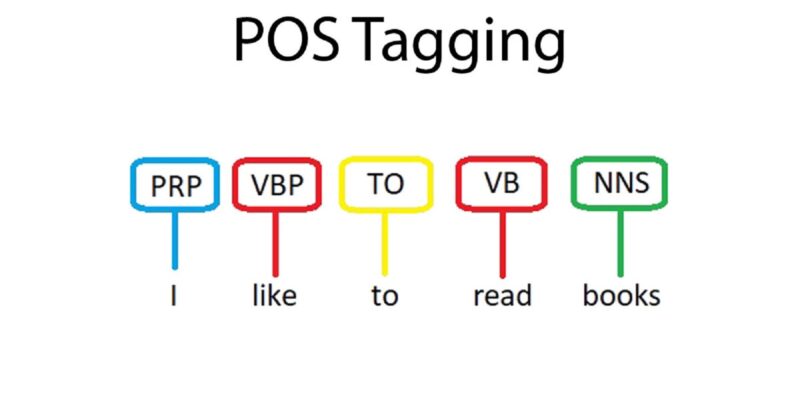
Source: ByteIota
The purpose of POS tagging is:
- to analyze the grammatical structure of sentences
- identify the syntactic roles of individual words within sentences.
Note: POS tagging can be performed using various techniques, including rule-based approaches, statistical models, and deep learning methods.
Some important encoding we get will nltk pos-tagging with what each represesnt.
| Tag | Description | Example |
|---|---|---|
| NN | Noun, singular or mass | cat, dog, book |
| NNS | Noun, plural | cats, dogs, books |
| NNP | Proper noun, singular | John, London, Monday |
| NNPS | Proper noun, plural | Smiths, Americans, Androids |
| VB | Verb, base form | run, walk, jump |
| VBD | Verb, past tense | ran, walked, jumped |
| VBG | Verb, gerund or present participle | running, walking, jumping |
| VBN | Verb, past participle | run, walked, jumped |
| VBP | Verb, non-3rd person singular present | am, are, have |
| VBZ | Verb, 3rd person singular present | is, has, does |
| JJ | Adjective | big, red, tall |
| JJR | Adjective, comparative | bigger, redder, taller |
| JJS | Adjective, superlative | biggest, reddest, tallest |
| RB | Adverb | quickly, happily, loudly |
| RBR | Adverb, comparative | faster, happier, louder |
| RBS | Adverb, superlative | fastest, happiest, loudest |
| IN | Preposition or subordinating conjunction | in, on, at |
| PRP | Personal pronoun | I, you, he |
| PRP$ | Possessive pronoun | my, your, his |
| DT | Determiner | the, a, an |
sentence = "I live in most beautiful mumbai city"import nltk
nltk.download('averaged_perceptron_tagger')[nltk_data] Downloading package averaged_perceptron_tagger to [nltk_data] /root/nltk_data... [nltk_data] Unzipping taggers/averaged_perceptron_tagger.zip.
True
Note:
- First-time NLTK use or fresh environment requires you to download tagger
- NLTK prompts for download if absent.
Note:
- First-time nltk pos_tagger use or fresh environment requires punkt download.
from nltk.tokenize import word_tokenize
from nltk import pos_tag
sen_token = word_tokenize(sentence)
sen_token['I', 'live', 'in', 'most', 'beautiful', 'mumbai', 'city']
pos_tag(sen_token)[('I', 'PRP'),
('live', 'VBP'),
('in', 'IN'),
('most', 'JJS'),
('beautiful', 'JJ'),
('mumbai', 'NN'),
('city', 'NN')]- pos_tagging on tokenized words.
pos_tag(sentence.split())[('I', 'PRP'),
('live', 'VBP'),
('in', 'IN'),
('most', 'JJS'),
('beautiful', 'JJ'),
('mumbai', 'NN'),
('city', 'NN')]- pos_tagging on under unprocessed words in sentences
Name-Entity Recoginition

Source: MonkeyLearn
Note 1: NER enables the extraction of structured data from documents, improving search, analytics, and integration across systems.
Note 2: NER can be performed using various techniques, including rule-based approaches, ML method like HMM and deep learning methods.
import nltk
nltk.download('maxent_ne_chunker')
nltk.download('words')
[nltk_data] Downloading package maxent_ne_chunker to [nltk_data] /root/nltk_data... [nltk_data] Unzipping chunkers/maxent_ne_chunker.zip. [nltk_data] Downloading package words to /root/nltk_data... [nltk_data] Unzipping corpora/words.zip.
True
Note:
- First-time NLTK use or fresh environment requires maxent_ne_chunker and word download for nltk NER.
- NLTK prompts for download if absent.
!pip install svglingCollecting svgling
Downloading svgling-0.4.0-py3-none-any.whl (23 kB)
Collecting svgwrite (from svgling)
Downloading svgwrite-1.4.3-py3-none-any.whl (67 kB)
━━━━━━━━━━━━━━━━━━━━━━━━━━━━━━━━━━━━━━━━ 0.0/67.1 kB ? eta -:--:--
━━━━━━━━━━━━━━━━━━━━━━━━━━━━━━━━━━━━╸━━━ 61.4/67.1 kB 1.8 MB/s eta 0:00:01
━━━━━━━━━━━━━━━━━━━━━━━━━━━━━━━━━━━━━━━━ 67.1/67.1 kB 1.6 MB/s eta 0:00:00
Installing collected packages: svgwrite, svgling
Successfully installed svgling-0.4.0 svgwrite-1.4.3
Now, let's do NER
import nltksentence = "Ousted WeWork founder Adam Neumann lists his Manhattan penthouse for $37.5 million"pos_tagged = pos_tag(nltk.word_tokenize(sentence))nltk.ne_chunk(pos_tagged)